
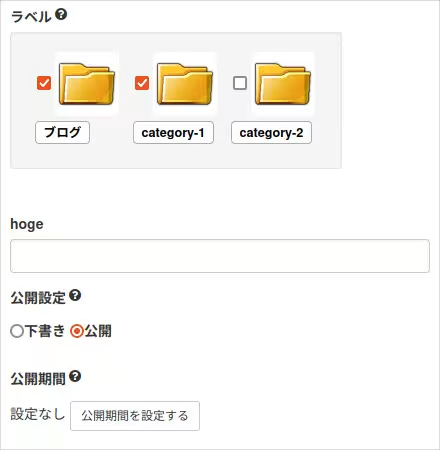
記事投稿画面でカスタムフィールドのフォームを追加するで追加したカスタムフィールドのフォームからデータベースに値を登録してみます。
クラス名等が重なってエラーにならないようにプラグインID : plugin_custom_saveという新規のプラグインを設けて話を進めます。
plugin_custom_saveのファイル構成は下記の通り
/CMSインストールディレクトリ/common/site_include/plugin/以下が
plugin_customfield_save
├── form
│	├── PluginCustomfieldSaveSamplePage.class.php
│	└── PluginCustomfieldSaveSamplePage.html
└── plugin_customfield_save.php
plugin_customfield_save.php
<?php

class PluginCustomfieldSavePlugin{

	const PLUGIN_ID = "plugin_customfield_save";

	function getId(){
		return self::PLUGIN_ID;
	}

	function init(){
		CMSPlugin::addPluginMenu(self::PLUGIN_ID,array(
			"name" => "プラグインのカスタムフィールドサンプル2",
			"type" => Plugin::TYPE_NONE,
			"description" => "",
			"author" => "",
			"url" => "",
			"mail" => "",
			"version" => "1.0"
		));

		// 当プラグインが有効であるかを調べる
		if(CMSPlugin::activeCheck(self::PLUGIN_ID)){
			if(defined("_SITE_ROOT_")){
				// 公開側ページの方で動作する拡張ポイントで使用したいものを追加する

			}else{
				// 管理画面側の方で動作する拡張ポイントで使用したいものを追加する

				CMSPlugin::addCustomFiledFunction(self::PLUGIN_ID, "Entry.Detail", array($this, "onCallCustomField"));
				CMSPlugin::addCustomFiledFunction(self::PLUGIN_ID, "Blog.Entry", array($this, "onCallCustomField_onBlog"));
			}
		}
	}

	// 記事投稿画面用
	function onCallCustomField(){
		$arg = SOY2PageController::getArguments();
		$entryId = (isset($arg[0])) ? (int)$arg[0] : 0;
		return self::_buildCommonForm($entryId);
	}

	// 各ブログページからの記事投稿画面用
	function onCallCustomField_onBlog(){
		$arg = SOY2PageController::getArguments();
		$entryId = (isset($arg[1])) ? (int)$arg[1] : 0;
		return self::_buildCommonForm($entryId);
	}

	/**
	 * カスタムフィールドの共通箇所
	 * @param int
	 * @return html
	 */
	private function _buildCommonForm(int $entryId){
		SOY2::import("site_include.plugin.plugin_customfield_save.form.PluginCustomfieldSaveSamplePage");
		$form = SOY2HTMLFactory::createInstance("PluginCustomfieldSaveSamplePage");
		$form->setEntryId($entryId); // 現在表示中の記事のIDをセットしておく
		$form->execute();
		return $form->getObject();
	}

	public static function register(){
		$obj = CMSPlugin::loadPluginConfig(self::PLUGIN_ID);
		if(!$obj) $obj = new PluginCustomfieldSavePlugin();
		CMSPlugin::addPlugin(self::PLUGIN_ID, array($obj, "init"));
	}
}

PluginCustomfieldSavePlugin::register();
https://github.com/inunosinsi/SOY2/blob/master/SOY2HTML/SOY2HTMLComponents/HTMLForm.class.php
SOY2HTMLで出力するフォーム(PluginCustomfieldSaveSamplePage)を動的に変更できるようにします。
PluginCustomfieldSaveSamplePage.class.php
<?php

class PluginCustomfieldSaveSamplePage extends WebPage {

	private $entryId;

	function __construct(){}

	function execute(){
		parent::__construct();

		// 下記のコードで<input type="text" soy:id="hoge">が使用できるようになります
		$this->createAdd("hoge", "HTMLInput", array(
			"name" => "hoge",
			"value" => soycms_get_entry_attribute_value($this->entryId, "custom_hoge", "string")
		));
	}

	function setEntryId($entryId){
		$this->entryId = $entryId;
	}
}
PluginCustomfieldSaveSamplePage.html
<div class="form-group">
	<label>hoge</label>
	<input type="text" class="form-control" soy:id="hoge">
</div>
上記の修正により、
<input type="text" name="hoge" class="form-control" value="">
が出力されるようになりました。
記事投稿画面に設置したカスタムフィールドでは<form>タグの設置は不要になります。
これは記事投稿画面全体を<form>で囲っていて、カスタムフィールドもこの<form>タグを利用してPOST送信するからです。
PluginCustomfieldSaveSamplePage.class.phpの方で、soycms_get_entry_attribute_value(記事ID, フィールドID, データ型)という関数を使用していますが、これはEntryAttributeテーブルから記事IDとフィールドIDの指定で取り出す便利な関数です。
※データ型は省略可です。
https://github.com/inunosinsi/soycms/blob/master/cms/common/site_include/func/dao.php
https://github.com/inunosinsi/soycms/blob/master/cms/common/sql/init_site_mysql.sql
設置したフォームからPOST送信した値をデータベースに登録するようにコードを追加します。
<?php

class PluginCustomfieldSavePlugin{

	const PLUGIN_ID = "plugin_customfield_save";

	function getId(){
		return self::PLUGIN_ID;
	}

	function init(){
		/** プラグインの情報の登録の箇所は省略 **/

		// 当プラグインが有効であるかを調べる
		if(CMSPlugin::activeCheck(self::PLUGIN_ID)){
			if(defined("_SITE_ROOT_")){
				// 公開側ページの方で動作する拡張ポイントで使用したいものを追加する

			}else{
				// 管理画面側の方で動作する拡張ポイントで使用したいものを追加する

				// 記事の新規作成と更新のタイミングでonEntryUpdateメソッドを実行する
				CMSPlugin::setEvent("onEntryUpdate", self::PLUGIN_ID, array($this, "onEntryUpdate"));
				CMSPlugin::setEvent("onEntryCreate", self::PLUGIN_ID, array($this, "onEntryUpdate"));

				CMSPlugin::addCustomFiledFunction(self::PLUGIN_ID, "Entry.Detail", array($this, "onCallCustomField"));
				CMSPlugin::addCustomFiledFunction(self::PLUGIN_ID, "Blog.Entry", array($this, "onCallCustomField_onBlog"));
			}
		}
	}

	/**
	 * 記事作成時、記事更新時
	 */
	function onEntryUpdate($args){
		$entryId = $args["entry"]->getId();

		// 下記の手続きでEntryAttributeテーブルに値を挿入できる
		$attr = soycms_get_entry_attribute_object($entryId, "custom_hoge");
		$attr->setValue($_POST["hoge"]);
		soycms_save_entry_attribute_object($attr);
	}

	/** カスタムフィールドのフォームとプラグインの登録のメソッドは省略 **/
}
CMSPlugin::setEventで、onEntryCreate(記事の作成直後)とonEntryUpdate(記事の更新直後)のイベントを追加します。
今回はどちらのイベントでもonEntryUpdateメソッドで処理を行うようにしていますが、記事の作成と更新で処理を分けたい場合は各々の処理用のメソットを用意してください。
onEntryUpdateメソッド内の
$attr = soycms_get_entry_attribute_object($entryId, "custom_hoge");
$attr->setValue($_POST["hoge"]);
soycms_save_entry_attribute_object($attr);
の手続きで、EntryAttributeテーブルに簡単に値を挿入出来ます。
https://github.com/inunosinsi/soycms/blob/master/cms/common/site_include/func/dao.php
今回のコードは下記のURLにサンプルコードがあります。
カスタムフィールドの拡張ポイント関連で実際のプラグインでコードを確認したい場合はカスタムエイリアス(プラグインID : custom_alias)がおすすめです。
https://github.com/inunosinsi/soycms/tree/master/cms/common/site_include/plugin/custom_alias